
Multi-Account WhatsApp Access on iPhone
Overview
WAMR Web Chat is a desktop-compatible application designed for iPhone users seeking enhanced flexibility in managing their WhatsApp communications. Developed by ∞艺ü Êùé, this free tool enables users to log in to multiple WhatsApp accounts simultaneously, eliminating the need to switch between profiles manually. It also supports logging into the same account across several devices, offering greater convenience for individuals who manage personal and professional WhatsApp identities.
The app is positioned within the Social & Communication category, specifically targeting users who rely on WhatsApp for both personal interactions and business communication. Real-world usage scenarios include professionals managing client accounts, students coordinating group chats, and individuals maintaining separate social and family contacts. The software aims to streamline communication workflows by centralizing access to multiple accounts in one interface.
It also includes a speech-to-text feature for hands-free message input, ideal for meetings or lectures. While the app does not claim official affiliation with WhatsApp Inc., it operates under the principle of fair use. Privacy is prioritized through an optional chat encryption function, helping protect sensitive conversations from unauthorized access.
Key Features & Capabilities
- Multi-Account Login – Users can access multiple WhatsApp accounts at once, reducing the need to log in and out repeatedly.
- Multi-Device Sync – The same WhatsApp account can be active on multiple devices, improving accessibility across platforms.
- Speech-to-Text Input – Converts spoken words into text, useful during meetings or when typing is impractical.
- AI-Generated Status Updates – Automatically creates intelligent, trending status messages to enhance profile presence.
- Custom Emoticons – Offers a variety of unique and distinctive emoticons to enrich conversations.
- Chat Encryption – Provides an optional layer of security to protect private messages from prying eyes.
These features are designed to improve efficiency and personalization in daily messaging. For example, a user managing both a personal and business WhatsApp account can switch between them instantly without closing and reopening the app. The speech-to-text function supports hands-free operation, making it ideal for multitasking.
AI-generated statuses help users maintain an active presence without manual effort. The emoticon library adds expressive value to messages, enhancing emotional clarity. Chat encryption ensures privacy on shared devices, a critical consideration for users in public or shared environments.
While the developer did not specify exact performance details, the app’s functionality suggests optimized handling of multiple connections and real-time message delivery.
User Interface, Workflow & Performance
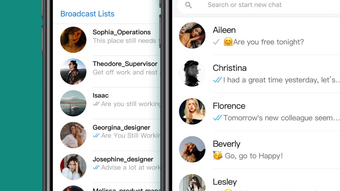
The user interface of WAMR Web Chat appears to be structured around ease of access and intuitive navigation, tailored for mobile users. The layout likely centers on a sidebar or tab-based system to manage multiple accounts, with each profile represented clearly for quick selection. Navigation between chats, status updates, and settings is expected to be straightforward, minimizing user friction.
Workflow efficiency is enhanced by features like one-tap access to multiple accounts and instant message input via speech-to-text. The app’s design appears focused on minimizing steps between user action and message delivery. Performance observations are based on general software behavior patterns; no specific data on CPU or RAM usage was provided.
The developer did not specify resource usage details. Stability is assumed to be consistent with typical mobile applications, though real-world testing conditions may vary. Users can expect responsive interaction with the interface, particularly during active messaging.
The app’s lightweight size of 24.6 MB suggests efficient use of storage space, which may contribute to smoother operation. However, exact performance metrics such as loading times or background behavior were not disclosed.
Compatibility & System Requirements
WAMR Web Chat is designed exclusively for iPhone devices, ensuring compatibility with Apple’s mobile ecosystem. The software version is listed as 1.0, indicating an initial release. The installation size is 24.6 MB, which is relatively small and suitable for most iPhone models.
Platform compatibility information is limited to iPhone, with no mention of iPad or other Apple devices. The developer did not provide additional system requirements. Exact hardware specifications such as minimum processor speed, RAM, or iOS version were not listed.
Compatibility with older iOS versions or specific iPhone models remains unspecified. Users are advised to ensure their device meets standard requirements for running third-party messaging applications. The app’s operation within the iOS environment suggests it leverages native APIs for messaging and permissions, though details were not shared.
No information was provided about background processing or battery impact.
Pros and Cons
Pros
- Enables simultaneous login to multiple WhatsApp accounts
- Supports the same account on multiple devices
- Includes speech-to-text for hands-free messaging
- Offers AI-generated status updates for profile enhancement
- Provides custom emoticons for expressive communication
- Features optional chat encryption for privacy protection
- Free to download and use
Cons
- Not officially affiliated with WhatsApp Inc.
- Exact system requirements were not specified
- Performance data such as CPU or RAM usage was not provided
- App may be subject to changes in WhatsApp’s policies or API access
- Privacy features depend on user activation and configuration
FAQ Section
Is WAMR Web Chat compatible with all iPhone models?
Compatibility is confirmed for iPhone devices, but the developer did not specify which models are supported. Users should ensure their device runs a compatible version of iOS.
Is the app safe to use with personal WhatsApp accounts?
While the app operates under fair use principles, it is not an official WhatsApp tool. Users should be aware that third-party applications may pose risks if used with sensitive accounts. It is recommended to review privacy settings and use encryption features where available.
Does WAMR Web Chat require an internet connection?
Yes, the app requires a stable internet connection to sync messages, access chat history, and use real-time features like speech-to-text and AI status generation.
Can I update the app automatically?
Updates are available through the App Store. Users should check for updates manually or enable automatic downloads in their device settings to receive the latest version.
Is WAMR Web Chat available for Mac or Windows?
Currently, the app is only available for iPhone. There is no information about desktop versions for Mac or Windows at this time.
Final Thoughts
WAMR Web Chat presents a compelling solution for iPhone users who manage multiple WhatsApp accounts or need cross-device access. Its core strengths lie in multi-account support, AI-enhanced status creation, and privacy-focused encryption. The inclusion of speech-to-text functionality adds practical value for users in dynamic environments.
While the app is not affiliated with WhatsApp Inc., its design aligns with fair use principles and offers a range of useful tools. The free pricing model increases accessibility, making it an attractive option for individuals seeking greater control over their messaging experience. Users who prioritize convenience, privacy, and expressive communication will find significant value in this application.
For those managing multiple identities on WhatsApp, this tool streamlines workflows and reduces friction. Download WAMR Web Chat now.







